Skip to content
Activity
· 3m 58s
Thinking
Thinking longer for a better answer

Thinking longer for a better answer

Opening puzzle image for analysis
python
bash -lc ls -l /mnt/data/puzzle1.png && python3 - <<'PY' from PIL import Image img=Image.open('/mnt/data/puzzle1.png') print(img.size) PY
-rw-r--r-- 1 root oai_shared 14615 Jan 16 23:04 /mnt/data/puzzle1.png
(700, 782)
Analyzed image
Output image
Interpreting grid symbols and transformations

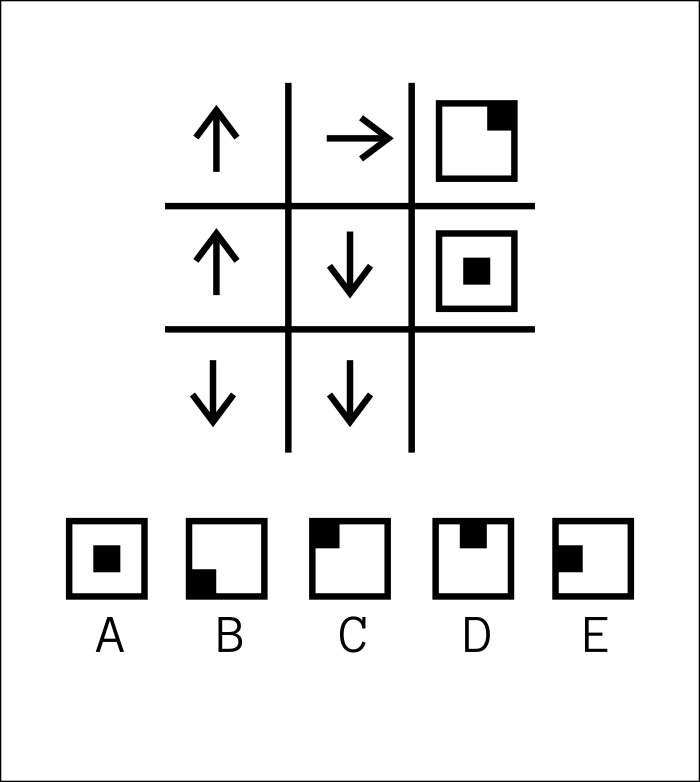
I see a 3x3 grid with various symbols including arrows and squares. The arrows in the first two columns likely indicate transformations that produce the resulting symbol in the third column for each row. The third column features different types of squares, with various borders and notches that suggest specific transformations are happening.

Inferring symbol transformations based on arrows

Let's explore the pattern: in row2, the arrows indicate movement and result in a centered black square. Row1's arrows seem to cause a cutout at the top, similar to option D, but slightly shifted. Maybe the arrows represent cuts or shifts in the position of elements within the square, with each row showing a effect.

Further analyzing grid transformations

In row1, the notch isn't centered but near the right edge, and I think the right border might also be thick. Considering the options, they show various cutouts and filled shapes, possibly representing the path traced by the arrows. Maybe the arrows define a movement pattern, and the third column shows the result of that movement.

Exploring 3x3 grid and arrow patterns

I'm thinking of the 3x3 grid, where the arrows represent operations row by row, forming column-wise transformations. The first arrow seems to indicate vertical positioning (up or down), while the second controls horizontal shifts. Analyzing the results, row 2 gives the filled center, row 1 produces a notch, and row 3 could result in a bottom fill.

Analyzing top-right symbol and arrow interactions

In row 1, the arrows (up + right) should create a notch at the top-right of the square, which might signal a hole in the border instead of a filled block. Row 2's arrows seem to cancel out, leaving a filled center. This leads me to consider if the direction of arrows defines initial position, then a toggle for cutout or filled space. I’ll need to inspect the top-right symbol more to clarify.

Cropping top-right cell from image
python
bash -lc python3 - <<'PY' from PIL import Image img=Image.open('/mnt/data/puzzle1.png') # crop top-right cell area crop=img.crop((430,60,650,280)) crop.save('/mnt/data/topright.png') print(crop.size) PY
(220, 220)
Analyzed image
Output image
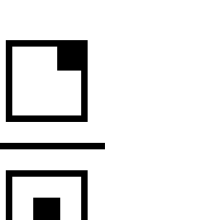
Examining top-right corner notch and border

The top-right corner has a thick black border with a notch on the right side, where the border steps inward. This creates a white gap at the top-right corner, similar to a missing section replaced by an inner corner. I’ll compare this with the options to see if any match, then crop them for clarity.

Cropping options area for comparison
python
bash -lc python3 - <<'PY' from PIL import Image img=Image.open('/mnt/data/puzzle1.png') # crop options crop=img.crop((60,430,640,740)) crop.save('/mnt/data/options.png') print(crop.size) PY
(580, 310)
Analyzed image
Output image
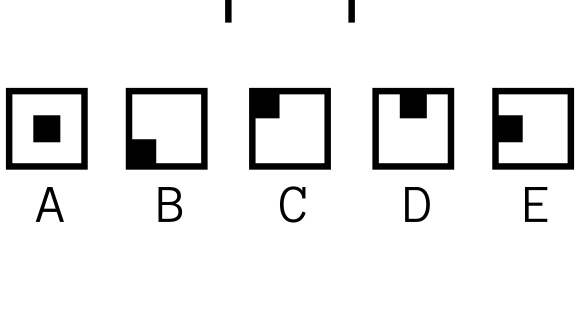
Comparing options and analyzing top-right notch

Option C has a filled black block at the top-left, while Option B has one at the bottom-left. Option D features a centered notch at the top, and E has a notch at the right. The top-right symbol resembles D but shifted to the corner. I'll crop for better comparison.

Cropping middle-right section of image
python
bash -lc python3 - <<'PY' from PIL import Image img=Image.open('/mnt/data/puzzle1.png') crop=img.crop((430,250,650,470)) crop.save('/mnt/data/midright.png') PY
Analyzed image
Output image
Understanding grid arrow interactions and outputting result

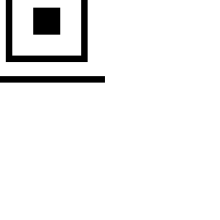
In the middle-right, it seems that the shape matches option A, so row 2 yields option A. For row 3, I’m thinking that the down, down arrows might result in a bottom-right notch, although it's not clear which option that corresponds to. I’ll focus on how the arrows might guide movement within the output square.

Considering row arrow sequences for output

For Row 1, the arrows moving up then right create an L-shaped pattern, leading to a missing top-right corner. This suggests a notch at the top-right in the output. Row 2 seems to return to the center, leaving it filled, while Row 3’s arrows might produce a notch at the bottom center.

Interpreting arrow sequences for output positions

If the net movement is zero, the black square stays centered (A). A movement up and right creates a corner notch, removing the top-right corner. Two downward arrows seem to indicate a notch at the bottom, but Row 2’s up and down movements cancel, leaving the center square (A).

Analyzing arrow sequences for block movement

When two downward arrows are used, it could imply a filled block at the bottom-left. If the arrows are the same direction, it might create a filled corner, while different directions could suggest a notch. For Row 2, the mixed up/down produced the center filled, not a notch. I’m pondering how vertical and horizontal movements fit together based on the arrows.

Exploring how arrows affect border and square positions

I've been thinking that the arrows might represent missing parts of the border rather than a square’s position. For example, Row 1 ends with a missing top-right corner. When arrows move in opposition, like up and down, maybe it places a black square instead of a notch. This impacts how shapes transform across rows.

Refining logic for notch and square positions

I'm testing the idea that the arrows in each row might control notches or fills along the border. Row 2’s arrows seem to point toward a central black square, while row 3’s arrows point downward, possibly leading to a filled bottom center. Given the patterns, there might be a way to infer which option fits.

Considering arrow directions as edge modifications

I’m thinking that the arrows might represent how the edges of a square are modified. For example, row 1’s up and right arrows could cut the top and right edges, creating a notch at the top-right. For other rows, maybe the arrows indicate which edges remain or are kept, but the result isn't fitting perfectly yet.

Analyzing arrow directions and modifications

It looks like the arrows might indicate how a black square inside a boundary moves or deforms. If the arrows are opposite, they could cancel each other, leading to a full border with a center square. If they’reperpendicular, they create a notch. This is making me lean toward option B for the bottom-left filled choice.

Interpreting arrow movements and notches

For row2, starting in the center and moving up then down results in a center square—option A. In row1, moving up and right hits the top-right edge, leaving a notch. For row3, moving down twice could create a bottom-center notch, but it’s not directly represented in the options. Option D might be a rotated version.

Choosing the notch based on movement

Starting at the center, applying down arrows in row 3 moves beyond the bottom, potentially creating a bottom-notch. However, option D shows a top-notch instead. If vertical orientation isn’t critical, maybe D is the right choice. Row 1 suggested a top-right notch, but options seem generalized.

Thought for 3m 58s

Done